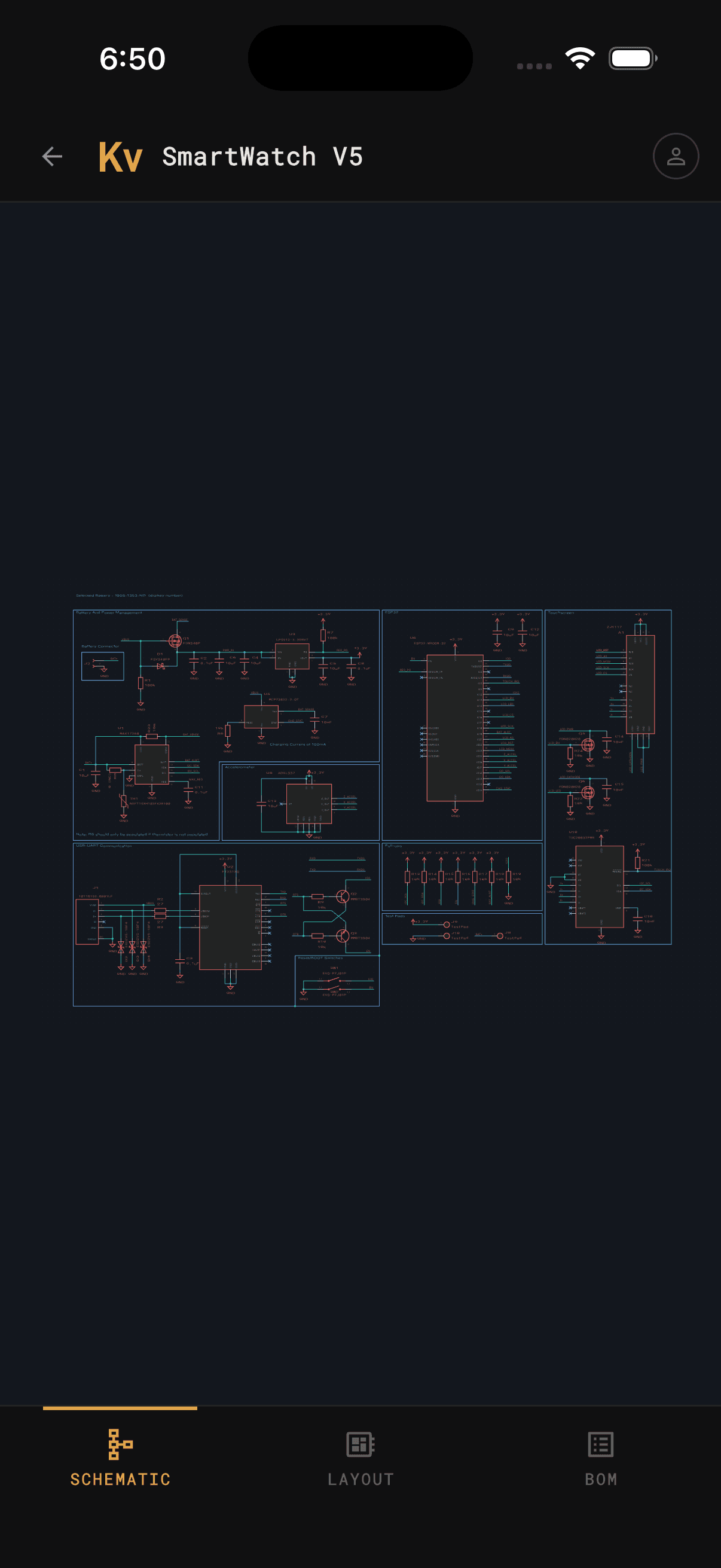
A fast, native KiCad viewer for iOS and Android. Open .kicad_sch and .kicad_pcb files as they are — browse schematic sheets, toggle every PCB layer, and keep your bill of materials open right at the bench, from local files or straight from GitHub, GitLab, or Gitea.
What it does
No exports, no PDFs, no “let me check when I’m back at my machine.” Open the real project files and inspect them the way you would in the editor.
Point the app at a .kicad_pro on your device and it parses everything locally — schematic sheets, the board, and the full BOM. Nothing leaves your phone.
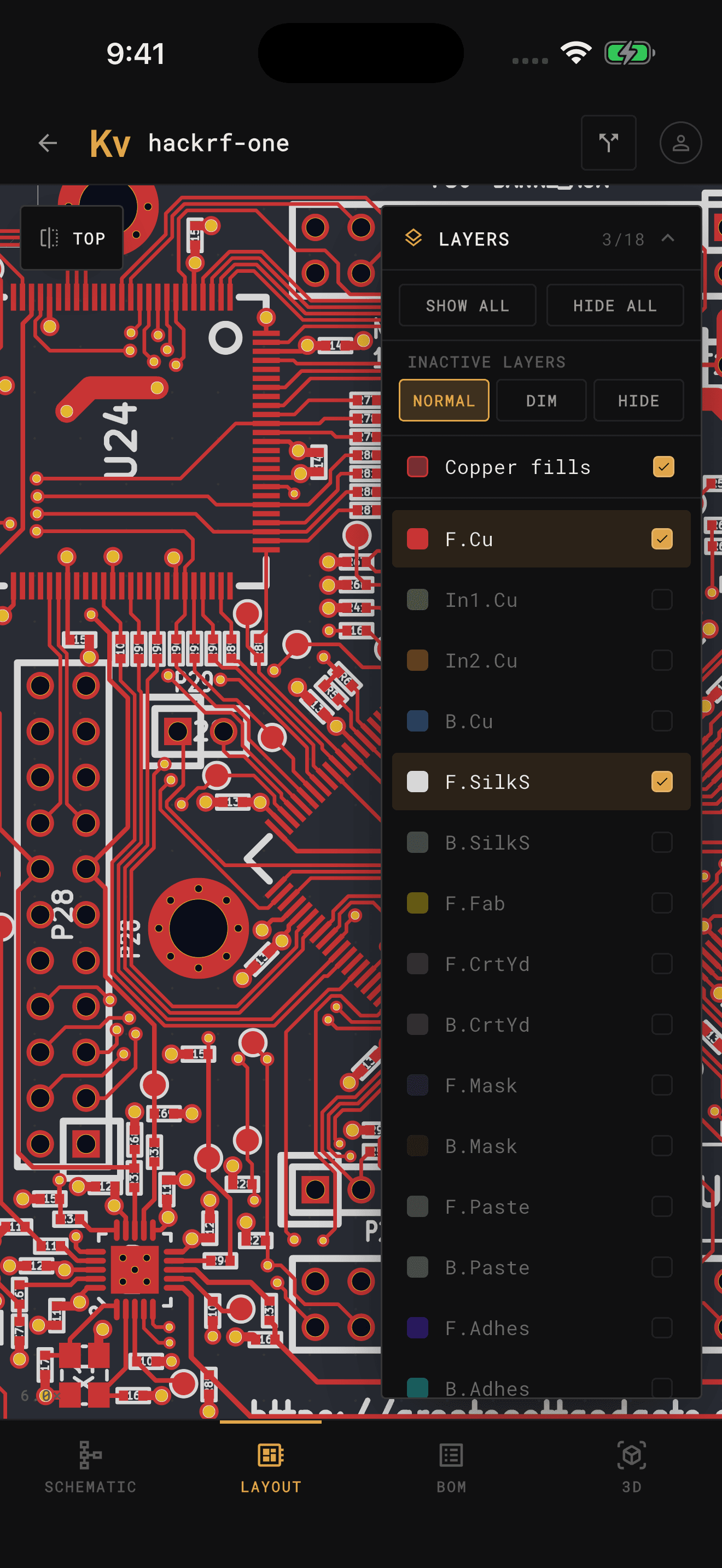
Pan, zoom, and toggle every copper, silkscreen, fab, and courtyard layer — rendered in KiCad-accurate colors. Isolate a single net or see the whole stackup at once.
Sign in to GitHub, GitLab, or your own Gitea or Forgejo instance and open any repository — public or private. Clone a board, pull updates, switch branches, and start reviewing in seconds, no desktop checkout required.
Keep the BOM and board side by side while you populate. Search any reference designator, read off its value and footprint, and tap a part to highlight it on the board.
Pull requests
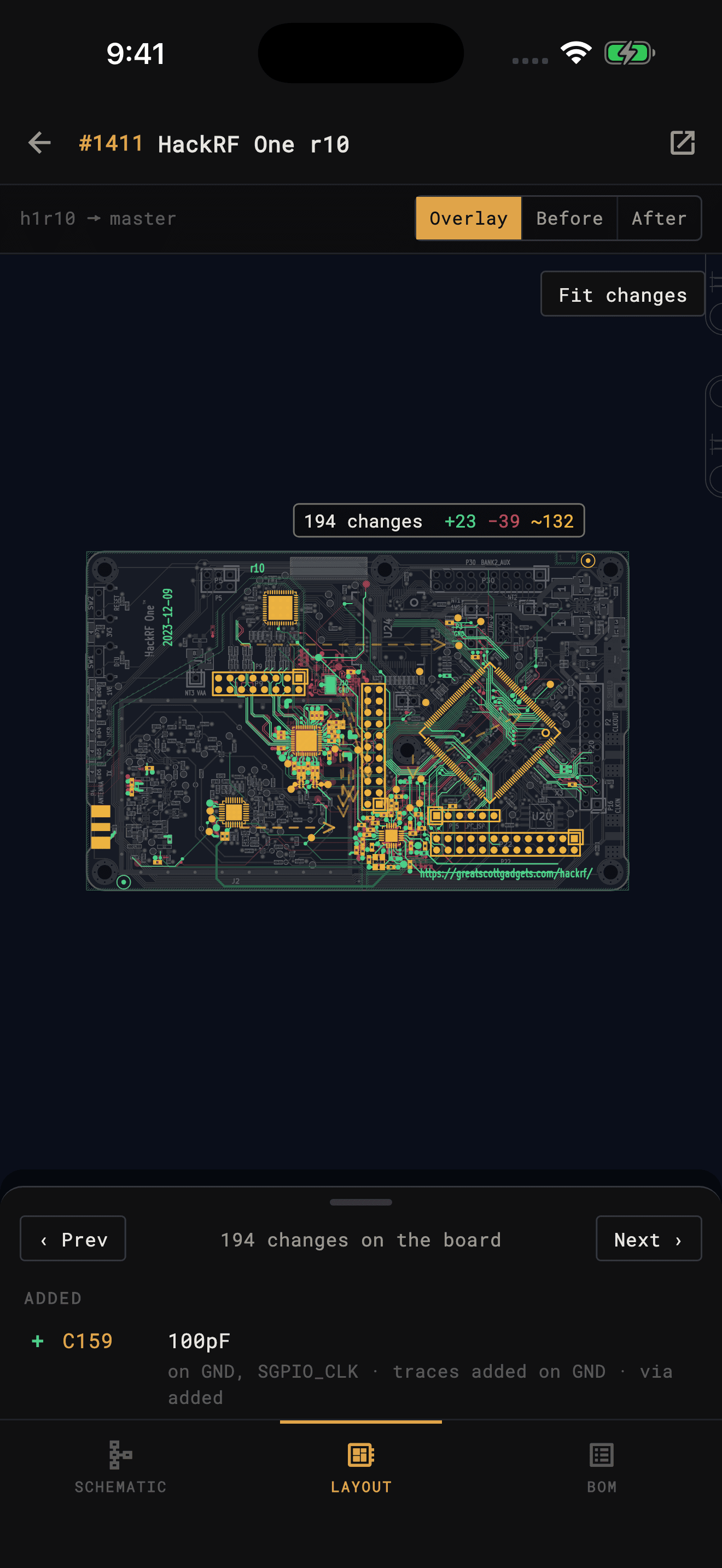
Open a pull request or merge request and KiCad Viewer downloads both versions of the project and lines them up. Every part, track, wire and BOM line that was added, removed or changed is marked on the layout, the schematic and the BOM.
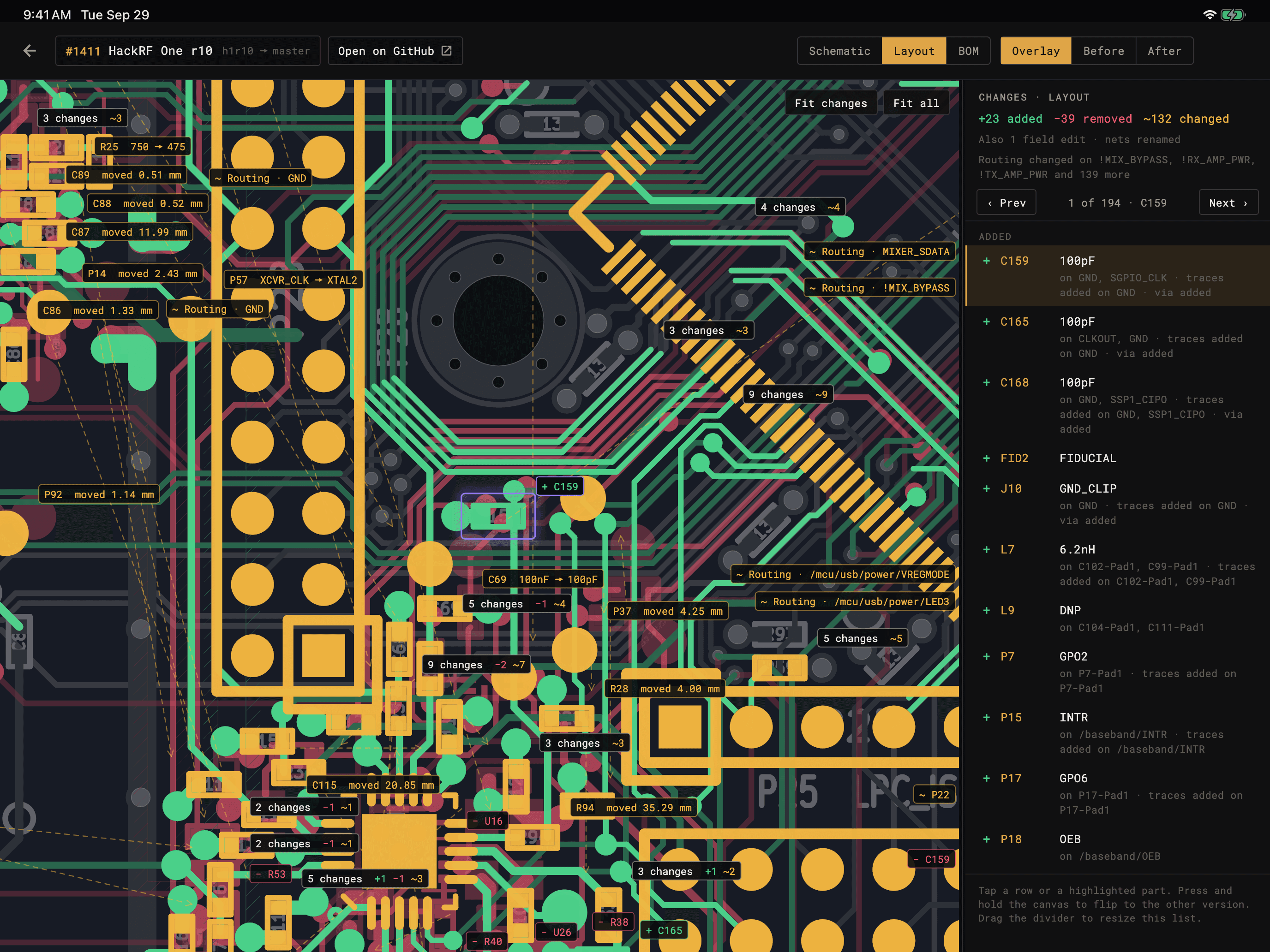
Overlay draws the new version in gray with each change in color. Before and After show one version with its changes in full; press and hold to flip between them.
The list counts every change. Step through them with Prev and Next, and moved parts say how far they went.
A refilled zone, renumbered nets, a board moved on the page or a KiCad 5 to 6 conversion doesn't show up as a change.
GitHub, GitLab, Gitea, Forgejo and Codeberg. Paste a pull request link to compare it without cloning; public GitHub repositories need no sign-in.
Try it freeThe app comes with a real one: HackRF One’s r10 pull request, 194 changes on the board. Tap Sample pull request on the start screen. No account needed.
3D and AR
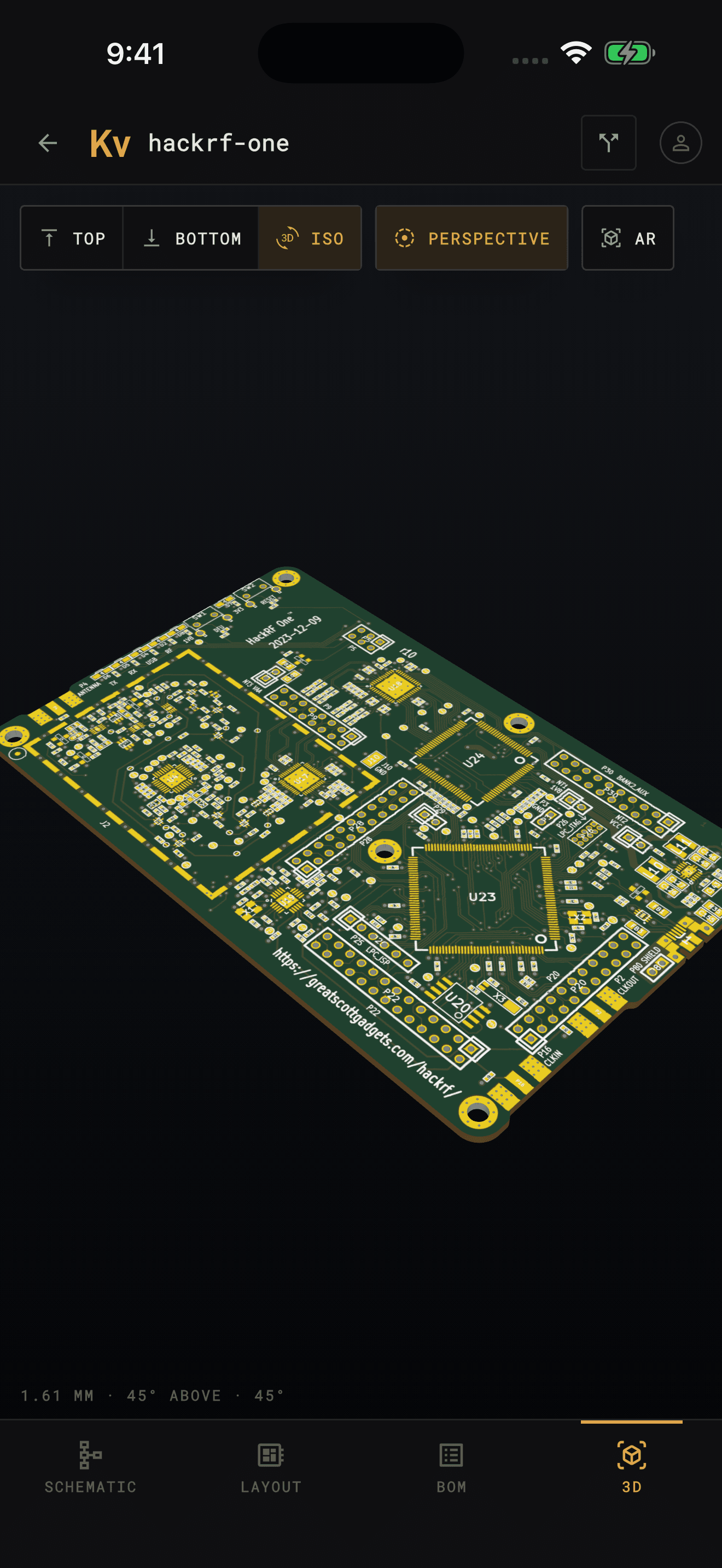
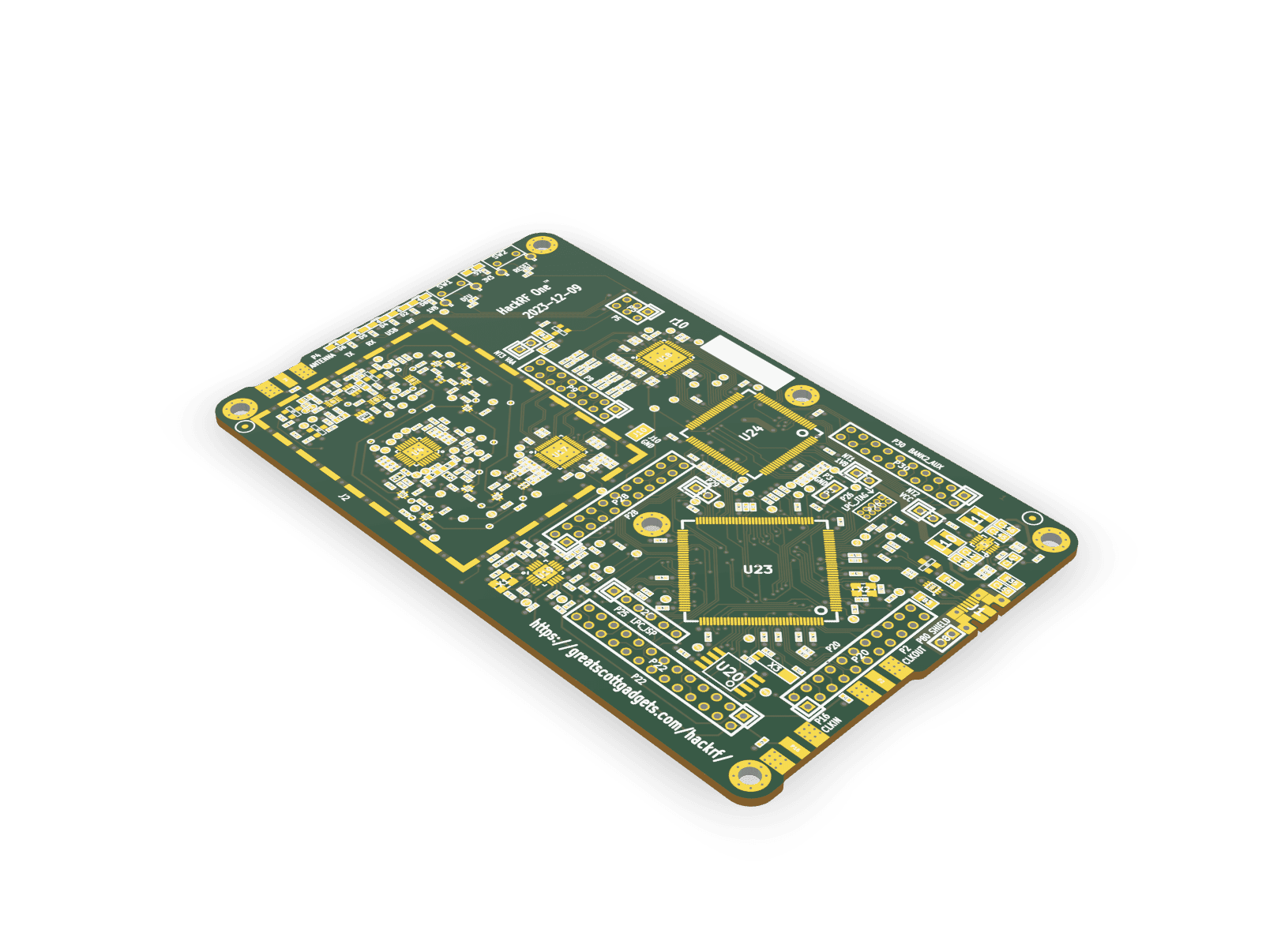
The 3D view builds the board from the file: outline, drill holes, copper, solder mask and silkscreen. Turn it with a finger, flip it over, or tilt it into perspective. Tap a part and it lights up on the schematic too.
AR puts the board on your desk at its real size, through AR Quick Look on iPhone and iPad and Scene Viewer on Android.
Layer control
Every layer keeps its real KiCad name and color. Show the whole board, peel it back to a single copper layer to trace a net by eye, or dim everything but the layer you’re on, like KiCad’s high-contrast mode.
At the bench
This is what KiCad Viewer was made for. Prop your phone up next to the reel, pull up the bill of materials, and work through the board one part at a time — quantities, grouped reference designators, values, and footprints, exactly as they appear in your project.
Plans
The HackRF One demo project opens free with everything in the app, and so does its sample pull request. Your own projects need Pro. Pull request review and the 3D view need Plus, which includes everything in Pro.
Pro and Plus each come as a monthly subscription, with a free trial for new subscribers, or as a one-time purchase. Prices are on the App Store and Google Play.
| Feature | Free | Pro | Plus |
|---|---|---|---|
| HackRF One demo project, every feature | ✓ | ✓ | ✓ |
| Sample pull request | ✓ | ✓ | ✓ |
| Your own folders and files | — | ✓ | ✓ |
| Clone and sync from GitHub, GitLab, Gitea | — | ✓ | ✓ |
| Pull and merge request review | — | — | ✓ |
| 3D board view and AR | — | — | ✓ |
Questions
What the app opens, where it runs, and what happens to your files.
Yes. KiCad Viewer is a native app for iPhone and iPad on the App Store, and for Android phones and tablets on Google Play. The same project opens identically on both.
It reads native KiCad files as they are — .kicad_pro projects, .kicad_sch schematics, and .kicad_pcb boards, including multi-sheet hierarchical designs. Legacy KiCad 5 .sch schematics and their symbol libraries work too. There is no export step and nothing to convert.
Every board and schematic format from KiCad 5 through KiCad 10, including newer KiCad 10 constructs such as barcodes, hatched fills, rounded rectangles, and hop-over wires.
Yes. Sign in to GitHub, GitLab (including self-hosted instances), or a Gitea, Forgejo, or Codeberg server, and clone any repository you have access to — public or private. You can pull updates and switch branches from inside the app.
Yes, with Plus. Pick an open pull request or merge request from GitHub, GitLab, or a Gitea, Forgejo, or Codeberg server, or paste its link, and KiCad Viewer downloads both versions and marks every part, track, wire, and BOM line that was added, removed, or changed, on the board, the schematic, and the BOM. Changes that don't change the design, such as a refilled zone or renumbered nets, are left out. A sample pull request on the HackRF One demo is free to try.
Yes, with Plus, and free on the demo project. The 3D view builds the bare board from the file — outline, drill holes, copper, solder mask, and silkscreen. Turn it, view it from the top, the bottom, or a corner, and tap a part to find it on the schematic. Parts aren't modeled, because a KiCad file names each part's 3D model without including it. On supported devices, AR puts the board on a real surface at its actual size.
Yes. On iPhone and iPad, pick a project folder anywhere the Files app reaches — iCloud Drive, a folder another app syncs, or a network share — or tap a .kicad_pro, .kicad_sch, or .kicad_pcb file in Files to open it. On Android, pick the folder with the system file picker.
No. Projects are parsed on the device and the app never uploads your files. Repository access uses your own account, and access tokens are kept in the system keychain. AR is the one place a board leaves the app: a 3D model of it goes to the device's AR viewer — AR Quick Look on iPhone and iPad, Google's Scene Viewer app on Android.
No — it is a viewer. KiCad Viewer never writes into a project, so the files you open are the files you keep.
Yes. The BOM groups parts by value and footprint with quantities and reference designators, and tapping a row highlights every matching part on both the schematic and the board.
The app is free to download. The bundled HackRF One demo — a real board with its schematic sheets and BOM — opens with every feature, the 3D view included, and so does its sample pull request, so you can see how it handles a design first. Opening your own projects needs Pro. Plus adds pull request review and the 3D view to everything in Pro. Each comes as a monthly subscription, with a free trial for new subscribers, or as a one-time purchase. Current prices are on the App Store and Google Play listings.
If you bought it before Plus came out, yes. Plus is included as a thank-you for backing the app early, and there is nothing you need to do. A lifetime Pro bought since then can be upgraded to Plus for the price difference, or with a Plus subscription.
No — KiCad Viewer renders your files with its own independent implementation. Text is drawn in KiCad's own stroke font and the rendering is checked against KiCad's plots of the same files, but some schematics or boards may still not appear exactly as they would in KiCad. Please reach out at hello@kicadviewer.com if your design is not rendering correctly.
No. KiCad Viewer is not affiliated with, endorsed by, or sponsored by the KiCad project or its maintainers.
Get the app
KiCad Viewer is available now for iPhone, iPad, and Android. Grab it from the App Store or Google Play and open your first board.
 KiCad Viewer